One of the most common pattern being used within distributed systems on AWS is fan-out. Simple definition for fan-out would be when one event happens multiple independent systems need to react to it.
Simple example could be when a user wants to place an order we may want to:
- Send confirmation email
- Update analytics
- Trigger warehouse processing
- …
Without fan-out, the order service would need to call every downstream system directly which of course creates tight coupling, slower responses and even more failure points.
However with fan-out in place, the order service publishes one event and the infrastructure distributes that event to multiple consumers.
Overall we can summarize that fan-out helps with:
- Decoupling – producers and consumers do not depend directly on each other
- Scalability – each consumer can scale separately
- Resilience – one failing consumer does not block the others
- Extensibility – new consumers can be added without changing the producer
- Asynchronous processing – the main application can respond faster
This pattern is commonly used within serverless solutions, microservices and event-driven workloads. Let’s use some AWS services to further explain things.
Fan-out with SNS
Amazon SNS is probably the most straightforward AWS service for fan-out since it uses a publish-subscribe model so we can say it is fan-out by default. A publisher sends a message to the SNS topic, and SNS delivers that message to all subscribed endpoints.
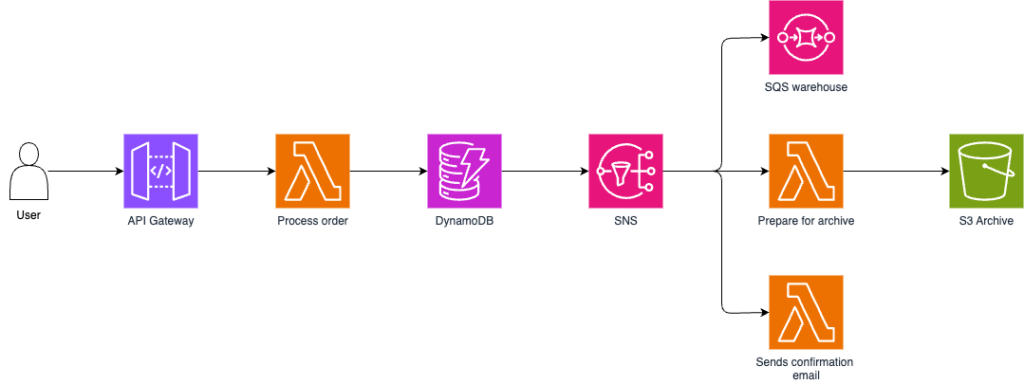
In this example, a user places an order through API Gateway endpoint. The request is processed by a Lambda function, which validates and stores the order in DynamoDB and after that it publishes and event OrderPlaced to an SNS topic.
Instead of invoking downstream services directly, SNS distributes the event to multiple independent subscribers. Each subscriber performs a different task without affecting others:
- SQS queue – receives the event so that warehouse service can prepare the shipment
- S3 Archive – usually through Lambda stores event for auditing and long-term retention
- Lambda – which prepares and formats confirmation email
Fan-out with SNS and SQS
This is one of the most useful AWS fan-out architectures. SNS distributes the event, while SQS gives each consumer its own durable buffer.
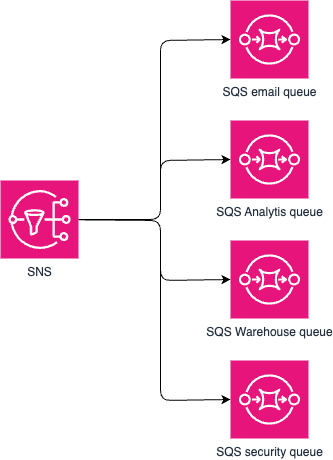
SNS distributes the event to multiple SQS queues, allowing each consumer to process messages independently. This have several benefits:
- Loose coupling – the producer only publishes an event and does not need to know which services consume it (meaning you can later just add more consumers)
- Independent scaling – each consumer can scale based on its own workload
- Failure isolation – if one consumer fails or is temporarily unavailable, the others continue to work normally
- Reliable delivery – SQS stores messages until they are successfully processed and supports retries and dead-letter queues. In this case each service could have its own retry and DLQ configuration depending on the needs
Use this pattern when:
- Every consumer must receive the event
- Consumers process at different speeds
- Failures should be isolated
- You need durable asynchronous processing
- You want each team or service to own its own queue
Fan-out with Kinesis
Unlike SNS, where messages are pushed to subscribers, Kinesis Data Stream allows multiple independent consumer applications to read the same stream of events. For example we could have Kinesis stream for clicking events and then consumers could be: realtime analytics, data lake ingestion, security inspection, etc.
In this setup, the producer writes each event only once and multiple consumers reads independently and process data for different purposes.
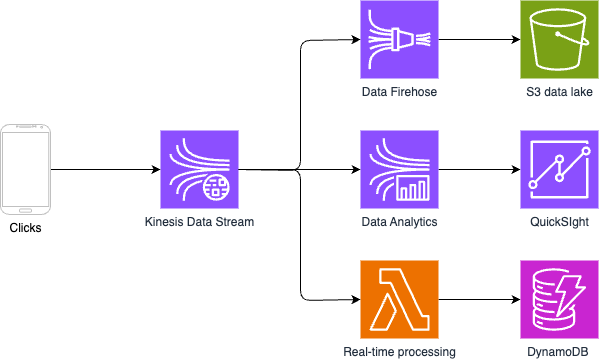
A single stream of click events is written once to Kinesis Data Stream. Multiple services consume data and process same stream simultaneously for different purposes, such as real-time processing via Lambda function, long-term storage through Kinesis Data Firehose into S3 bucket and real-time analytics.
Enhanced Fan-Out
Kinesis also has a feature called enhanced fan-out. Normally, multiple consumers reading from the same shard share read throughput. With enhanced fan-out, each registered consumer gets dedicated read throughput per shard. That matters when you have multiple real-time consumers and you do not want them competing with each other.
Since with this feature enabled each registered consumer receives its own dedicated throughput of up to 2 MB/s per shard. This is especially useful when multiple real-time applications consume the same stream, as they no longer compete for bandwidth or increase each other’s latency.
Important thing to mention is that enhacned fan-out is not “enabled” globaly, instead you need to create registered consumer for each application.
Use Kinesis fan-out when:
- You process high-volume event streams
- Ordering per partition key matters
- Consumers need to replay data
- Events are part of analytics, monitoring, ML, or telemetry pipelines
- Multiple stream processors need the same data