When you need very low latency data access, Redis is usually one of the first storage that comes to mind. However traditional Redis is often used as a cache, which means the source of truth still lives somewhere else.
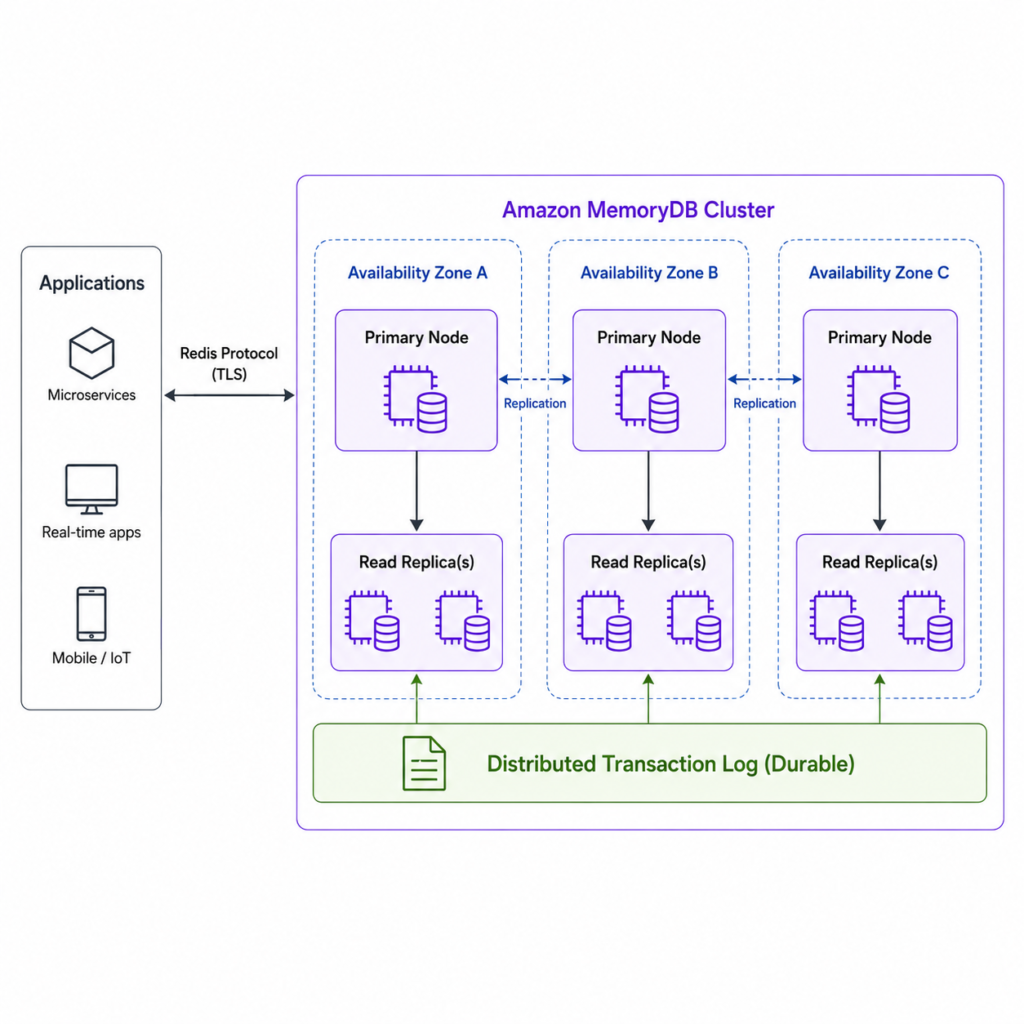
Amazon MemoryDB is rather a durable, Redis OSS and Valkey-compatible in-memory database. That means we can use familiar Redis commands and client libraries, but AWS stores the data durably across multiple Availability Zones using a transactional log.
MemoryDB
Amazon MemoryDB is a managed in-memory database service compatible with Redis OSS and Valkey APIs.
AWS positions MemoryDB as a primary database for applications that need very fast reads and writes. According to the AWS docs, MemoryDB stores all data in memory for microsecond read latency and single-digit millisecond write latency, while also keeping the data durable across multiple Availability Zones.
So the service gives us two things at the same time:
- Redis-compatible API
- Durable Multi-AZ storage
Imagine you are building a microservice that needs to keep latest info about IoT devices. For example every device send frequent status update and backend application needs to read that with very low latency.
device:123 -> status = active
device:123 -> temperature = 6.4
device:123 -> lastSeen = 2026-06-19T10:15:00ZCommon approach for this would be to use Redis as a fast cache and another durable database, for example DynamoDB or PostgreSQL as the source of truth. Redis would provide fast reads, while the durable database would protect the data from loss. But this also means the application has to manage two layers: cache invalidation, data synchronization, fallback logic, consistency concerns, and possibly operational overhead.
With MemoryDB, the architecture can be simpler for this type of workload. The application can use familiar Redis-compatible commands and client libraries, while MemoryDB keeps the data in memory for low-latency access and stores it durably across multiple Availability Zones.
MemoryDB data storing
MemoryDB stores data using familiar Redis-style data structures:
- strings
- hashes
- lists
- sets
- sorted sets
- streams
- JSON-like serialized values
From the application side, you connect with a Redis-compatible client:
from redis.cluster import RedisCluster

MEMORYDB_ENDPOINT = "memorydb-cluster-endpoint"
MEMORYDB_PORT = 6379
MEMORYDB_USERNAME = "lambda-user"
MEMORYDB_PASSWORD = "example-password"


def setup_memorydb_client():
    try:
        client = RedisCluster(
            host=MEMORYDB_ENDPOINT,
            port=MEMORYDB_PORT,
            username=MEMORYDB_USERNAME,
            password=MEMORYDB_PASSWORD,
            ssl=True,
            decode_responses=True,
        )

        client.ping()
        return client

    except Exception as error:
        logger.error(f"Failed to connect to MemoryDB: {error}")
raiseFor example, in our Lambda code we store the latest equipment state using the equipment number as the key:
def store_device_state(memorydb_client, device_event):
    device_id = device_event["deviceId"]

    device_state = {
        "deviceId": device_id,
        "status": device_event.get("status"),
        "temperature": device_event.get("temperature"),
        "batteryLevel": device_event.get("batteryLevel"),
        "latitude": device_event.get("latitude"),
        "longitude": device_event.get("longitude"),
        "lastSeenAt": device_event.get("lastSeenAt"),
    }

    memorydb_client.set(
        f"device:{device_id}:latest",
        json.dumps(device_state)
)In this example, the application first creates a Redis-compatible client connection to MemoryDB using TLS and password authentication. After that, each incoming device_event overwrites the latest state for that device, so the application can retrieve the current device state with a simple low-latency GET operation.
MemoryDB Architecture
A MemoryDB deployment is built around a cluster. The cluster stores the dataset, and the dataset can be split into one or more shards. Each shard has a primary node and optional replica nodes.
The primary node handles writes. Replica nodes can be used for reads and can be promoted if the primary node fails.
Cluster
└── Shard
      ├── Primary node
└── Replica node(s)A simplified Terraform example could look like this:
resource "aws_memorydb_cluster" "main" {
  name                       = "device-state-memorydb"
  node_type                  = var.is_prod == false ? "db.t4g.small" : "db.t4g.medium"
  num_shards             = 1
  num_replicas_per_shard = 1

  acl_name          = aws_memorydb_acl.main.name
  subnet_group_name = aws_memorydb_subnet_group.main.name
  security_group_ids = [
    aws_security_group.memorydb.id
  ]

  tls_enabled              = true
  kms_key_arn              = aws_kms_key.memorydb.arn
  snapshot_retention_limit = 7
}
This creates a small MemoryDB cluster with one shard and one replica. The important parts are:
- node_type – define sizes of MemoryDB nodes
- num_shards – define how the data is split
- num_replicas_per_shard – defines how many replicas each shard has
- tls_enabled – encrypts traffic between the application and MemoryDB
- kms_key_arn – enables encryption at rest
- subnet_group_name – places MemoryDB inside selected private subnets
- security_group_ids – controls which applications can connect to it
Most common usecase is to have a Lambda function that can connect to MemoryDB through a security group and use Redis-compatible commands to read and write data.
If the application writes data, the write goes to the primary node of the shard that owns that key. If replicas are configured, they help with availability and can serve read traffic. If the primary node fails, MemoryDB can promote a replica to keep the cluster available.
For example, if we store latest state for devices, each device can be represented as one key. MemoryDB distributes those keys across shards, so increasing the number of shards increases the total capacity of the cluster.
Authentication and ACLs
Access is controlled via users, ACLs and network access. Network access decides which applications can reach the cluster, usually through VPC subnets and security groups. Authentication decides which client is allowed to log in once it reaches the cluster. Authorization decides what that client can do after it connects.
MemoryDB supports two methods of authentication:
- Password authentication
- IAM authenticaion
Password authentication
Password authentication is the more traditional Redis-style approach. The application connects to MemoryDB using a username and password. This is simple to understand and works well when you want a familiar Redis-compatible setup.
A simplified Terraform example could look like this:
resource "aws_memorydb_user" "lambda_user" {
  user_name     = "lambda-user"
  access_string = "on ~* &* +@all"

  authentication_mode {
    type      = "password"
    passwords = [var.memorydb_password]
  }
}You can pass password variable via SOPS or some other AWS service as well:
memorydb_password = data.sops_file.env_secrets.data["spti.MEMORY_DB_PASSWORD"]You can create ACL to define which users are allowed to reach MemoryDB cluster:
resource "aws_memorydb_acl" "acl" {
  name       = "test-acl"
  user_names = [aws_memorydb_user.lambda_user.id]
}When you have multiple MemoryDB clusters and users this resource might come in handy.
IAM authentication
IAM authentication is more AWS-native. Instead of using a long-lived password stored in a secret, the application uses its AWS identity, such as a Lambda execution role, to generate a short-lived IAM authentication token. The client then uses that token when connecting to MemoryDB.
IAM authentication is useful when the application already runs on AWS, for example Lambda, ECS, or EKS, because access can be controlled through IAM policies. For example, a Lambda role can be allowed to connect only to a specific MemoryDB cluster and a specific MemoryDB user using the memorydb:Connect permission.
Which one to choose ?
Use password authentication when:
- You want a simple Redis-style setup
- Your client or library does not support IAM authentication well
- You are integrating with tools that expect username/password auth
Use IAM authentication when:
- Your workload runs on AWS
- You want short-lived credentials instead of static passwords
- You want to control access through IAM roles and policies
- You are building a more AWS-native security model
When to use MemoryDB
MemoryDB is a good fit when you need Redis-like performance, but the data is important enough that you do not want to treat it as disposable cache data.
Possible use cases:
- Latest state lookup for IoT devices
- Real-time user/session state
- Leaderboards
- Rate limiting with durability requirements
- Microservices needing fast primary storage
- Workloads currently using Redis plus a separate durable database
- …
Data insights
Tools like Redis Insight can be useful for connecting to MemoryDB, inspecting keys, viewing values, and debugging application state. Since MemoryDB is Redis/Valkey-compatible, this can make local investigation easier, but access should be limited and controlled through private networking, security groups, TLS, and proper authentication.
Costs
From a pricing perspective, MemoryDB is not really priced like a simpler cache service. The main costs come from the nodes you run, charged per instance-hour, the amount of data written, snapshot storage, and possible data transfer costs. For predictable long-running workloads, reserved nodes can reduce the node cost, but data written and snapshot storage are still billed separately.