Data ingestion layer is the entry point of a data platform. That means it receives data from external providers, devices, applications or even internal systems and brings it into the platform in controlled way.
In AWS ecosystem this layer is usually built with services like API Gateway, Kinesis Data Stream, Firehose, Lambda, SQS, S3. The main purpose of integration those services is to make data intake reliable and to decouple systems that produce data from systems that consume it.
Ingestion is the boundary between external providers and everything that happens inside the system:
- Real-time monitoring
- Analytics
- Alerting
- Historical replay
- Data lake sharing
- Operational reporting
- …
Let’s take a look at an example of high-level architecture:
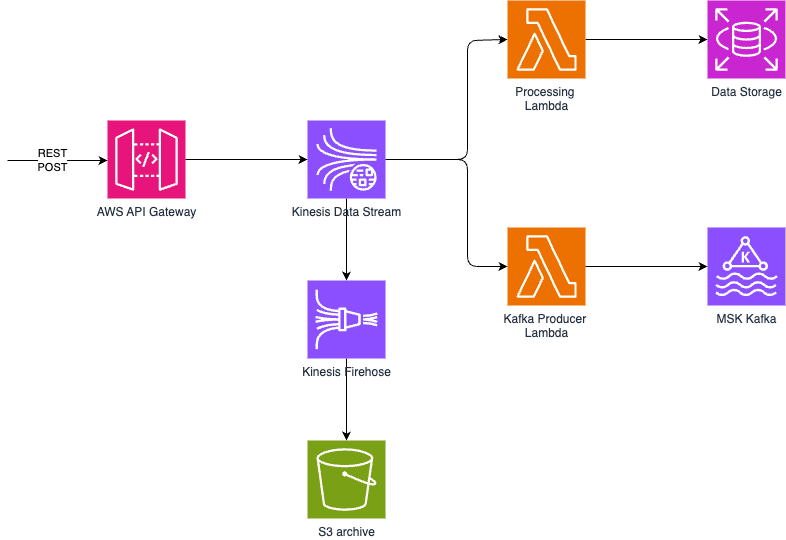
For example, imagine a car platform where each car sends telemetry events such as location, speed, battery level, temperature, etc. The ingestion layer receives those events through API Gateway and passes them into Kinesis, where they can be buffered and grouped by a meaningful key such as carId. In practice that means using carId as partition key. Kinesis uses that key to decided in which shard it will send that specific event.
API Gateway to Kinesis Data Stream
Many ingestion systems start with API Gateway -> Lambda -> Database. This works for small systems, but it makes the API too dependent on what happens behind it. If the database is slow, if the processing code has an issue, or if another internal service is unavailable, the API can also start failing. In other words, a problem inside the system becomes a problem for the data provider sending the request.
Better pattern would be that API Gateway acts as the controlled entry point since it can handle:
- Requests validation
- API Keys
- Cognito authentication & scopes
- Logging
- Request mapping
- Rate limiting
- Usage plans
With direct API Gateway -> Kinesis Data Stream integration, events are passed to Kinesis quickly and it becomes the event backbone of the platform. It buffers incoming data and allows multiple consumers to read the same events independently. You can read more about Kinesis fan-out pattern here.
This setup changes story a bit since API Gateway no longer needs to know how many internal services will use the data and in which way. It does not need to know whether the data will be stored in a time-series DB, RDS, sent to Kafka, archived in S3 or anything else.
As mentioned we have 3 consumers of the data:
- Kinesis Firehose to S3 for raw data archiving:
- This consumer is responsible for preserving the raw version of incoming events.
- The archive is useful when data needs to be replayed, inspected, audited, or used later for analytics.
- This is important because not every use case is known when the ingestion API is first built.
- Lambda producer to Kafka to deliver data to other services/teams:
- This consumer forwards events to Kafka so other services or teams can consume them through an internal streaming platform.
- External providers still send data only once, while internal systems can subscribe to the data in the way that fits them.
- Lambda processing and storage to DB:
- This consumer transforms events into a format optimized for application queries, monitoring, or reporting.
- The database becomes a read model, while the stream and archive preserve the original flow of events.
Why Kinesis works well
Kinesis Data Streams is useful because it gives the ingestion layer buffer. Producers can send events into the stream, while consumers process those events at their own pace. If one consumer is slow, another consumer does not have to be affected. If a new consumer is needed later, it can be added without changing the public API. This is especially useful when the same event has multiple purposes.
For example, one event might need to be:
- Stored for real-time queries
- Archived for long-term history
- Forwarded to another streaming platform
- Used for alerts
- Shared with a data lake
- Processed later in batch
The streaming layer also helps with buffering and scaling. Events can be grouped by a meaningful business key when ordering matters, while the platform can still scale horizontally as traffic grows.
Example of API Gateway -> Kinesis Data Stream integration:
x-amazon-apigateway-integration:
  credentials: ${api_iam_role}
  httpMethod: "POST"
  uri: "arn:aws:apigateway:${aws_region}:kinesis:action/PutRecord"
  responses:
    default:
      statusCode: "200"
      responseTemplates:
        application/json: |
          {
            "exampleId": "$context.requestId"
}This is the key part of API configuration. API Gateway uses an AWS service integration to call Kinesis PutRecord directly. The credentials field points to an IAM role that allows API Gateway to write to the stream. The response template returns a exampleId and it can be used later to trace or debug that specific request.
Usually this setup is managed via Terraform or other IaC. For example can create API Gateway, load the OpenAPI definition, creates streams, connect the required IAM roles and permissions.
Important part is that integration is explicit and controlled.
Some limitations to be aware of
- API Gateway request rate
- API Gateway has regional throttling limits, for example 10.000 requests per second by default. High-volume producers may need throttling, quotas, or a quota increase.
- API Gateway payload size
- Requests are limited to 10 MB. Very large payloads should not be sent directly through the API.
- API Gateway timeout
- Synchronous integrations have timeout limits.
- Kinesis throughput
- Kinesis has write and read throughput limits. If traffic grows or arrives in bursts, the stream must be sized or configured properly to avoid throttling.
- Kinesis record size
- Maximum single record size is 10240 KiB.
- Kinesis retention
- Kinesis is not long-term storage. Records are kept for a limited retention period, so S3 archiving is important if data needs to be replayed or audited later.
- Consumer limits
- Each consumer has its own processing capacity. A slow Lambda, Kafka producer, or database writer can fall behind even if ingestion is working correctly.
- Firehose record size limit
- Firehose has maximum record size of 1.000 KiB before base64 encoding.
- Firehose delivery is not real-rime
- Firehose buffers data before delivery. Buffer interval can be between 60 and 900 seconds and thats why it should not be used for low-latency processing rather for something like archiving.
- Lambda consumer limits
- Lambda event source mappings for Kinesis have limits such as maximum batch size 10.000 and maximum parallelization factor 10.
Use cases for this solution
Common use cases include:
- IoT telemetry ingestion
- Devices, vehicles, sensors send events such as location, temperature, status, battery level, or diagnostics. The stream allows real-time processing, long-term archiving, and downstream integrations from the same data flow.
- Partner or third-party data ingestion
- External providers send data to a controlled API which handles authentication, validation, and rate limiting, while Kinesis decouples provider integration from internal processing.
- Clickstream and user activity events
- Web or mobile applications send user interaction events. Some consumers can update analytics dashboards, while others archive raw events or forward them to machine learning pipelines.
- Operational event collection
- Internal systems can publish status changes, logs, alerts, or business events. Different teams can consume the same events without each system building direct integrations with every other system.
- Data lake ingestion
- Firehose can deliver raw or semi-processed events to S3, where they can later be queried, transformed, or shared with analytics platforms.
- Real-time monitoring and alerting
- Lambda consumers can process events as they arrive and trigger alerts, update operational databases, or calculate latest state for dashboards.
Conclusion
A good data ingestion layer is not only about receiving data. It is about creating a boundary between data producers and the internal systems that process that data.
By using API Gateway as the controlled entry point and Kinesis Data Streams as the event backbone, we keep the ingestion path simple and reliable. Producers send data to one place, while internal consumers can process, archive, transform, or forward the same events independently.
Firehose and S3 add an important historical layer for replay, debugging, audit, and analytics. Lambda consumers can then build the views and integrations the platform needs, without making the public API responsible for every downstream use case.