When API Gateway invokes a Lambda function, the simplest setup is to point the API directly to the Lambda function. Since we often deploy new version of Lambdas as they change over time, every time we deploy Lambda can publish a new version.
For example:
fir-api:1
fir-api:2
fir-api:3
...If API Gateway directly invokes the function without a version or alias, it is harder to control exactly which version is receiving traffic. Provisioned concurrency also works best when attached to a stable version or alias. It should not be treated as something that magically applies to every future update.
That is why there is a better pattern:
API Gateway -> Lambda alias -> published Lambda versionThis pattern makes deployments more predictable and also allows us to attach provisioned concurrency to the alias. Find more details here.
Published Lambda versions
In the Lambda module, the function is published:
resource "aws_lambda_function" "this" {
  function_name = var.lambda_name
  role          = var.lambda_iam_role_arn

  package_type = "Image"
  image_uri    = var.lambda_image_uri

  publish = true
}The important part is: publish = true as this tells AWS Lambda to publish a new immutable version when the function changes.
Lambda alias
A Lambda alias is a stable name that points to one specific Lambda version.
In Terraform:
resource "aws_lambda_alias" "fir_api_live" {
  name             = "live"
  function_name    = module.lambda["fir_api"].lambda_function_name
  function_version = module.lambda["fir_api"].lambda_function_version
}This creates an alias called live. You can think of it like this:
fir-api:live -> fir-api:7When a new version is deployed, Terraform can move the alias:
fir-api:live -> fir-api:8The API Gateway integration can keep calling live. It does not need to know the exact version number.
API Gateway invokes the alias
In the API stack, we pass the alias invoke ARN into the API module:
lambda_invoke_arn = {
  fir_api = aws_lambda_alias.fir_api_live.invoke_arn
}The OpenAPI definition uses that value:
x-amazon-apigateway-integration:
  type: aws_proxy
  httpMethod: POST
uri: ${lambda_invoke_arn.fir_api}So the request path becomes:
Client -> API Gateway -> Lambda alias live -> Lambda versionAPI Gateway invokes the live alias.
Lambda permission
API Gateway also needs permission to invoke the Lambda alias.
resource "aws_lambda_permission" "financial_instruments_reviewer" {
  statement_id  = "AllowInvokeFromAPI"
  action        = "lambda:InvokeFunction"
  function_name = aws_lambda_alias.fir_api_live.arn
  principal     = "apigateway.amazonaws.com"
  source_arn    = "${module.api.execution_arn}/*/*"
}This grants API Gateway permission to call the alias. The important part is:
function_name = aws_lambda_alias.fir_api_live.arnThat means the permission is scoped to the alias, not just the unqualified Lambda function.
Provisioned concurrency
Provisioned concurrency keeps Lambda execution environments initialized and ready to handle requests. Without it, a Lambda may need a cold start when traffic arrives.
With provisioned concurrency, AWS keeps a configured number of Lambda instances warm.
In Terraform:
resource "aws_lambda_provisioned_concurrency_config" "fir_api" {
  function_name                     = module.lambda["fir_api"].lambda_function_name
  qualifier                         = aws_lambda_alias.fir_api_live.name
  provisioned_concurrent_executions = contains(["dev", "test"], var.env) ? 1 : 3
  lifecycle {
    replace_triggered_by = [aws_lambda_alias.fir_api_live]
  }
}The important part is:
qualifier = aws_lambda_alias.fir_api_live.nameThis means provisioned concurrency is attached to the live alias. You can also use this if/else approach to define different values depending on the environment.
So if we configure:
provisioned_concurrent_executions = 3AWS keeps 3 execution environments ready for the Lambda version currently behind the live alias.
Currently active version can also be double checked:
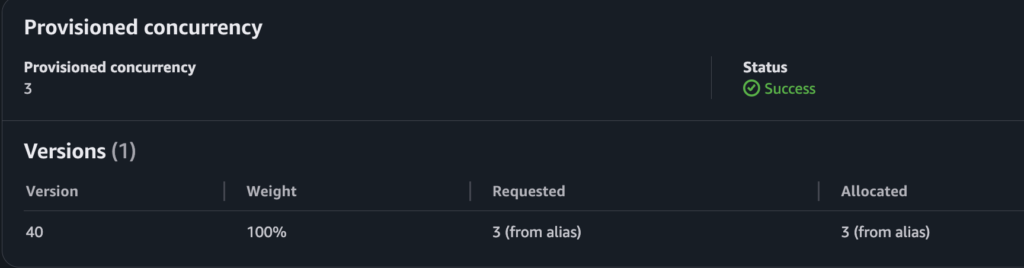
As you can see provisioned concurrency is set to 3 so AWS keeps 3 Lambda instances warm. Currently version 40 is active with weight of 100% meaning all traffic is going to that specific version. Alias requests 3 provisioned instances and also 3 are allocated as we can see from the image. The status is success so provisioned concurrency is working.
You can confirm within AWS Console when you open specific Lambda -> Configuration -> Concurrency and recursion detection and you will find something like this:

Within CloudWatch metrics you can check the provisioned concurrency utilization:

The metric is mostly around 33% meaning most of the time there is 1 out 3 warm Lambda instances. When metric reaches 100% meaning all 3 requested provisioned instances are active so at that time 3 out of 3 warm instances are active.
Attach provisioned concurrency to the alias
When the alias moves to a new Lambda version, the provisioned concurrency config should follow it.
This lifecycle rule helps with that:
lifecycle {
  replace_triggered_by = [aws_lambda_alias.fir_api_live]
}It tells Terraform:
If the live alias changes, recreate the provisioned concurrency config.The final flow looks like this:
1. Terraform deploys a Lambda function.
2. Lambda publishes a new version.
3. Terraform points the live alias to that version.
4. API Gateway integration invokes the live alias.
5. Lambda permission allows API Gateway to invoke that alias.
6. Provisioned concurrency keeps the live alias warm.