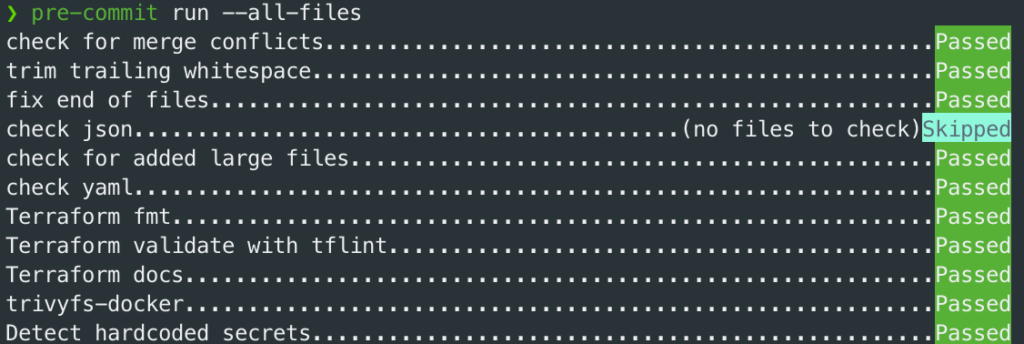
When working with Terraform it is good practice to catch simple issues as early as possible, before Ci/CD or PR review. For that reason, I usually add a .pre-commit-config.yml file to infrastructure repositories.
The goal isn’t of course to replace something within CI/CD, but to give option for quick local feedback for formatting, linting, documentation, security checks, secret detection etc.
Here is a baseline setup I like to use for Terraform projects:
# .pre-commit-config.yaml
exclude: "^.github|.tfsec|^gitlab-pipeline-main.tf"
default_install_hook_types: [pre-commit, pre-push, commit-msg]

repos:
  - repo: https://github.com/pre-commit/pre-commit-hooks
    rev: v6.0.0
    hooks:
      - id: check-merge-conflict
      - id: trailing-whitespace
      - id: end-of-file-fixer
      - id: check-json
      - id: check-added-large-files
      - id: check-yaml

  - repo: https://github.com/antonbabenko/pre-commit-terraform
    rev: v1.108.0
    hooks:
      - id: terraform_fmt

      - id: terraform_tflint

      - id: terraform_docs
        args:
          - --hook-config=--path-to-file=README.md
          - --hook-config=--add-to-existing-file=true
          - --hook-config=--create-file-if-not-exist=true
          - --hook-config=--use-standard-markers=true
          - --hook-config=--custom-marker-begin=<!-- BEGIN_TF_DOCS -->
          - --hook-config=--custom-marker-end=<!-- END_TF_DOCS -->
          - --hook-config=--custom-doc-header="# "

  - repo: https://github.com/mxab/pre-commit-trivy.git
    rev: v0.14.0
    hooks:
      - id: trivyfs-docker
        args:
          - --format=table
          - --severity=CRITICAL,HIGH
          - --skip-files=gitlab-pipeline-main.tf
          - .

  - repo: https://github.com/gitleaks/gitleaks
    rev: v8.16.1
    hooks:
- id: gitleaks-dockerWhat do I get with this setup
The first group of hooks comes from pre-commit-hooks. These are small but useful checks that prevent common mistakes:
- merge conflict markers accidentally committed
- trailing whitespace
- missing newline at the end of files
- invalid JSON or YAML
- unexpectedly large files
Let’s start with beginning:
exclude: "^.github|.tfsec|^gitlab-pipeline-main.tf"
default_install_hook_types: [pre-commit, pre-push, commit-msg]This section defines global behaviour for our pre-commit setup. The exclude skips files or folders that should not be checked locally, such as generated files, tool-specific folders or maybe pipeline files managed separately.
default_install_hook_types enables checks at different stages:
- before commit
- before push
- during commit message validation
This means that pre-commit tool can be ‘integrated’ to different Git moments:
- pre-commit start checks before commit is created
- example:
git commit -m "dummy commit"
- example:
- pre-push start checks before you push to remote
- example: git push
- commit-msg start checks over commit message
- example: commit must be in formate feat: add s3 module or fix: update lambda
- for this one you need commitizen to have real effect
repo
Repo is the main part of the pre-commit configuration. Each entry points to an external repository that contains one or more hooks we want to use.
Hook is small check or tool that runs automatically for example before commit.
  - repo: https://github.com/pre-commit/pre-commit-hooks
    rev: v6.0.0
    hooks:
      - id: check-merge-conflict
      - id: trailing-whitespace
      - id: end-of-file-fixer
      - id: check-json
      - id: check-added-large-files
- id: check-yamlThis means:
repois the source where the hooks are defined (public repo in this case)revis the exact version we want to usehooksis the list of checks we enable from that repoidis the specific hook name
In this setup there are different repos for different purposes:
pre-commit-hooksfor basic file quality checkspre-commit-terraformfor Terraform formatting, linting, and docspre-commit-trivyfor security scanninggitleaksfor detecting accidentally committed secrets
pre-commit-hooks
check-merge-conflictdetects unresolved git merge conflict markers before committrailing-whitespaceremoves unnecessary spaces at the end of linesend-of-file-fixerensures files end with a single newline- c
heck-jsonvalidates that JSON files are correctly formatted and parseable check-added-large-filesprevents accidentally committing large filescheck-yamlvalidates YAML syntax to catch broken config files early
pre-commit-terraform
terraform_fmtto keep all Terraform files consistently formatted.terraform_tflintto catch Terraform issues that formatting does not catch, such as invalid arguments, deprecated usage, or provider-specific problems.terraform_docsautomatically generates or updates Terraform documentation inREADME.md.--path-to-file=README.mWrites generated docs into the README file.--add-to-existing-file=true adds docs to an existing README instead of replacing the whole file.--create-file-if-not-exist=truecreates a README if one does not already exist.--use-standard-markers=trueuses markers to control where generated docs should be placed.--custom-marker-begin=<!-- BEGIN_TF_DOCS -->marks where generated Terraform docs start.--custom-marker-end=<!-- END_TF_DOCS -->marks where generated Terraform docs end.--custom-doc-header="# "adds a custom header format for generated documentation.
pre-commit-trivy
Trivy is scanning files in your code repository to look for security issues. It spins up a docker, so it is not running directly on your local machine and look for hardcoded secrets, wrong security configs, etc.
trivyfs-dockerruns Trivy filesystem scanning using Docker.--format=tableshows scan results in a readable table format.--severity=CRITICAL,HIGHreports only high and critical security findings to keep the output focused.--skip-files=gitlab-pipeline-main.tfskips this specific file from the scan, useful when a file is generated, external, or intentionally excluded.
gitleaks
It runs Gitleaks inside a Docker container, so you do not need to install Gitleaks directly on local machine.
gitleaks-dockerscans repo for accidentally committed secrets such as API keys, tokens, passwords, private keys, credentials etc.
Basically trivy is wider scanner while gitleaks is more for secrets scanning
How to use it
Install pre-commit:
pip install pre-commitInstall the hooks:
pre-commit install
pre-commit install --hook-type pre-push
pre-commit install --hook-type commit-msgRun everything manually:
pre-commit run --all-filesAfter you positioned in terminal inside your Terraform project and run command you will get output like this:
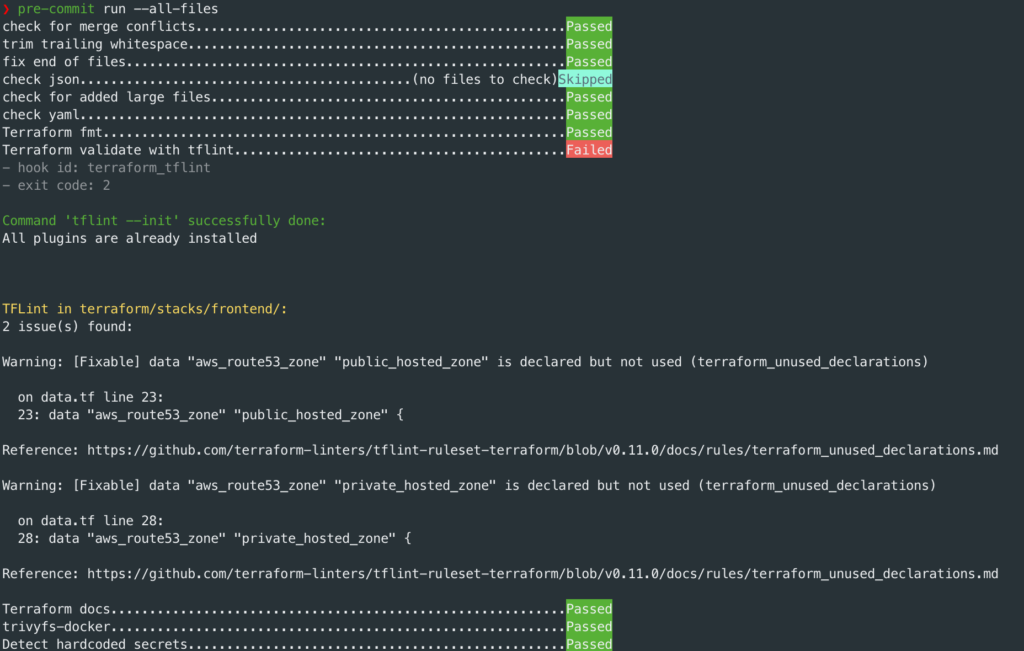
In this output you can notice 3 states:
- Passed means that check was succesfful
- Skipped means there were no matching files to check
- Failed means that hook found an issue or changed files automatically
In this example end-of-file-fixer failed at first because it fixes files by adding missing newline. This is expected behaviour so just review the modified files and run command again.
Also terraform_tflint failed with code 2 which means TFLint found an issue or could not complete check successfully for some reason. In such a case the issue was:

After fixing reported issue the result is: