When building event-driven architectures and data streaming workloads on AWS, two services often appear in the same conversation: Amazon Kinesis Data Streams and Amazon MSK, which is AWS managed Apache Kafka. At first glance, they solve a similar problem. Producers write events, consumers read events, and applications process data asynchronously. But while both services can move streaming data through a system, they are built around different architectural models, operational responsibilities, scaling patterns, and consumer behavior.
Kinesis Data Streams usually feels more AWS-native and simpler to manage. Amazon MSK gives you managed Kafka, which brings a wider ecosystem, Kafka-compatible tooling, and more control, but also more operational responsibility.
Kinesis Data Streams as an Ingestion Layer
Kinesis Data Streams is often a good fit when you need a simple AWS-native ingestion layer for incoming events. It can sit between producers and consumers, receive incoming traffic, keep records for a configured retention period, and allow multiple consumers to process the same stream independently.
Terraform example could look like this:
resource "aws_kinesis_stream" "events" {
  name             = "application-events"
  retention_period = 24

  stream_mode_details {
    stream_mode = "ON_DEMAND"
  }

  encryption_type = "KMS"
  kms_key_id      = aws_kms_key.streaming.arn
}In this example, the stream uses on-demand mode, which means we do not need to manually manage shard count upfront. Kinesis scales the stream capacity based on traffic, which can be useful when the ingestion volume is not fully predictable.
If you used PROVISIONED instead of ON_DEMAND, you must define and manage the shard capacity yourself, which gives you more predictable control but also requires planning, scaling, and monitoring throughput manually. Once the stream exists, producers can start writing records into it.
A producer can be a backend service, IoT device, Lambda function, or even API Gateway. For example, API Gateway can write directly into Kinesis using the PutRecord action:
x-amazon-apigateway-integration:
  type: aws
  httpMethod: POST
  uri: arn:aws:apigateway:${aws_region}:kinesis:action/PutRecord
  credentials: ${api_gateway_role_arn}
  requestTemplates:
    application/json: |
      {
        "StreamName": "application-events",
        "Data": "$util.base64Encode($input.body)",
        "PartitionKey": "$input.path('$.entityId')"
}This means the frontend or external client can send an event to API Gateway, and API Gateway can put that event directly into the Kinesis stream without requiring a custom ingestion service in the middle. The important part here is the PartitionKey.
Kinesis uses the partition key to decide which shard receives the record. Ordering is preserved only within a shard, so the partition key has a direct impact on how events are distributed and how consumers process them.
For example, imagine we are receiving telemetry events from cars. Each car sends location updates periodically:
{
  "carId": "car-123",
  "eventType": "locationUpdated",
  "latitude": 40.1234,
  "longitude": 20.1234,
  "timestamp": "2026-06-10T10:15:00Z"
}If we use carId as the partition key, all events for the same car are written to the same shard. That means a consumer can process events for car-123 in the same order in which they were written to that shard.
For example:
car-123 -> locationUpdated at 10:00
car-123 -> locationUpdated at 10:05
car-123 -> locationUpdated at 10:10This is useful when the application needs to build the latest state of the car, calculate movement, detect changes, or update a dashboard. If we used a random partition key instead, events for the same car could be spread across different shards. That might distribute traffic more evenly, but it would also make ordering per car harder to guarantee.
How Kinesis stores data
Kinesis stores records in a stream for a configured retention period. It is not a permanent database, it is rather a streaming buffer. Consumers read data records from the stream and track their own position. You can also define registered consumers for enhanced fan-out.
Enhanced fan-out is not required for every consumer of course, but it is useful when multiple consumers need dedicated read throughput from the same stream instead of sharing the standard shard read capacity. That allows one stream to feed multiple independent workloads:
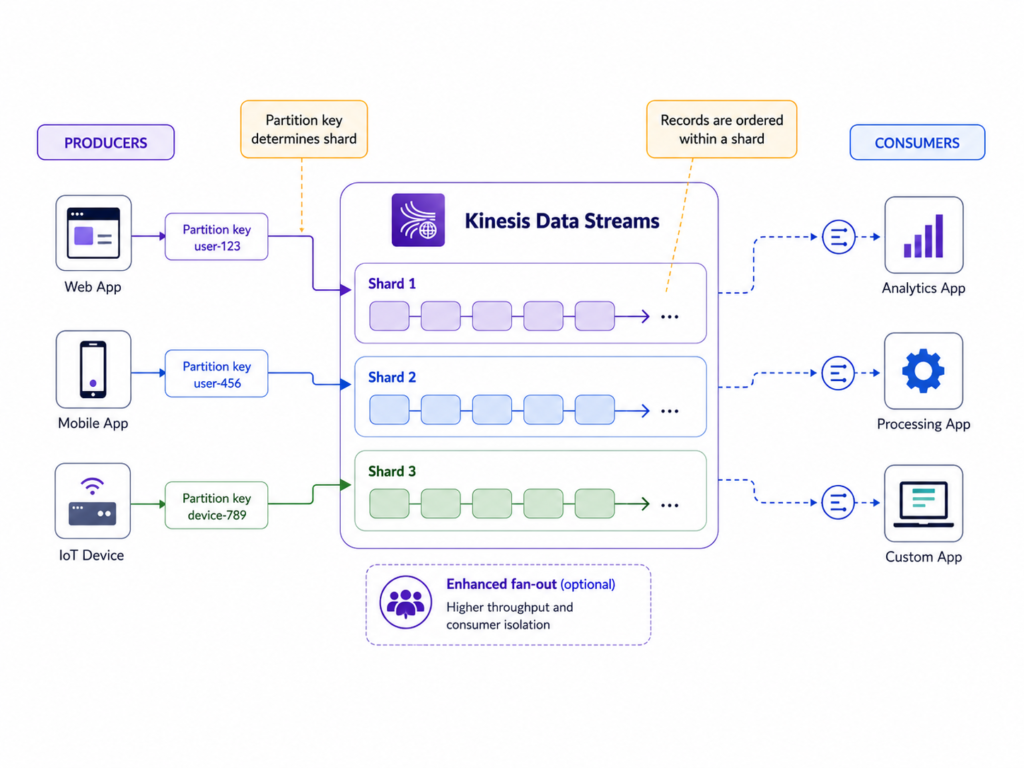
A Kinesis record can contain different types of payloads, such as JSON, CSV, plain text, log lines, compressed data, or binary data. According to AWS quotas, the maximum data payload size for a single record is up to 10 MiB before base64 encoding. Kinesis can handle intermittent large records in the 1–10 MiB range using burst capacity, but in most event-driven architectures it is better to keep records small, structured, and easy to process.
For large objects such as images, videos, PDFs, or exports, a common pattern is to store the file in S3 and send only the event metadata through Kinesis, such as the object key, bucket name, entity ID, timestamp, and event type. This keeps the stream focused on moving events through the system, while S3 handles durable object storage.
AWS MSK Kafka as a streaming platform
While Kinesis Data Streams is built around streams and shards, Kafka is built around clusters, brokers, topics, partitions, consumer groups, and offsets. That makes MSK feel less like a simple ingestion buffer and more like a full streaming platform.
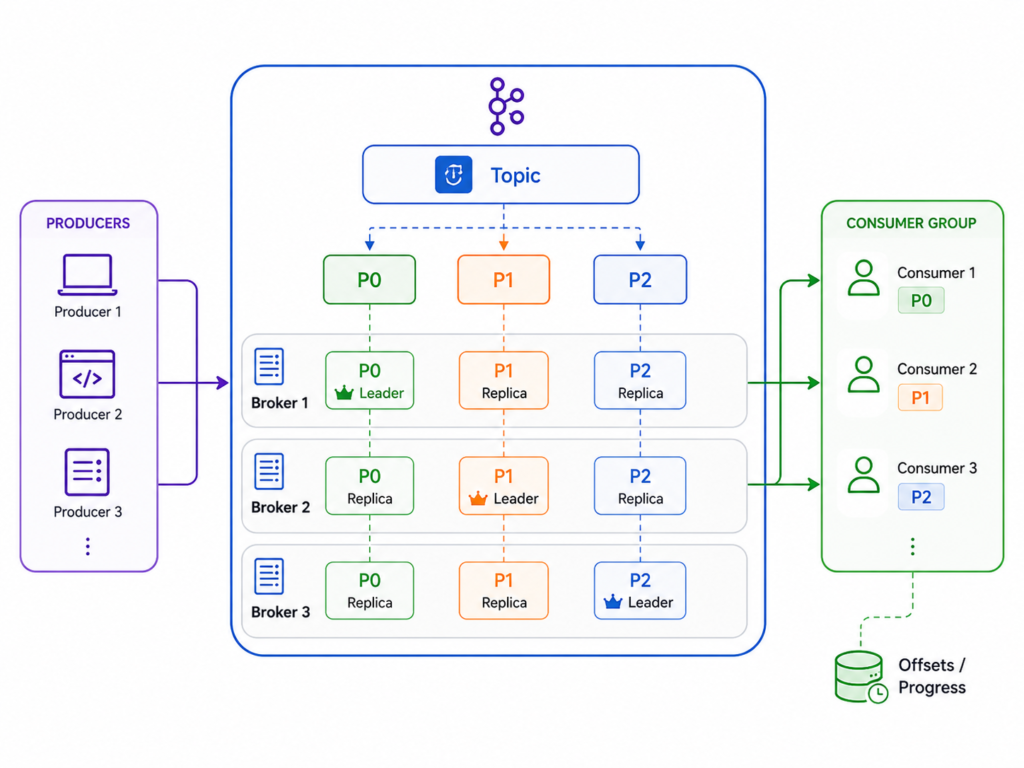
You can see how Amazon MSK uses a Kafka topic split into partitions, distributes those partitions across multiple brokers with a leader/replica model distributed across multiple AZs for availability, and allows a consumer group to read partitions while tracking progress through offsets.
A simplified Terraform example:
resource "aws_msk_cluster" "main" {
  cluster_name           = "application-kafka"
  kafka_version          = "3.6.0"
  number_of_broker_nodes = 3

  broker_node_group_info {
    instance_type   = "kafka.m5.large"
    client_subnets  = var.private_subnet_ids
    security_groups = [aws_security_group.kafka.id]

    storage_info {
      ebs_storage_info {
        volume_size = 100
      }
    }
  }

  encryption_info {
    encryption_at_rest_kms_key_arn = aws_kms_key.streaming.arn

    encryption_in_transit {
      client_broker = "TLS"
      in_cluster    = true
    }
  }

  client_authentication {
    sasl {
      scram = true
    }
  }
}This example creates a three-broker Kafka cluster in private subnets, with encrypted traffic, encrypted storage, and SASL/SCRAM authentication enabled. SASL/SCRAM is used in this case for client authentication. This means that producers and consumers need valid credentials before they can connect to the Kafka cluster, while TLS protects the traffic between clients and brokers.
In Kafka, producers write records to topics. A topic is a named stream of events, but internally it is split into partitions. Partitions are the unit of ordering and parallelism in Kafka.
For example, a producer could write car telemetry events to a topic called car-raw-events:
Producer -> topic: car-raw-eventsThat topic can then be split into multiple partitions:
car-raw-events
  - partition 0
  - partition 1
- partition 2Kafka guarantees ordering inside a single partition, not across the entire topic. So if we want all events for the same car to be processed in order, we would usually use carId as the Kafka message key. Kafka then uses that key to choose the partition.
For example:
car-123 -> partition 0
car-456 -> partition 1
car-789 -> partition 2This is similar in concept to a Kinesis partition key, but Kafka gives you more control over topics, partitions, retention, replication, consumer groups, and ecosystem tooling.
A typical set of topics in an application could be:
- car-raw-events
- processed-events
- entity-updates
- notifications
- …
One service may consume from raw-events, process the data, and publish a cleaned version to processed-events. In Kafka-based systems, it is common for one service to consume events from one topic, process or enrich them, and then publish the result to another topic. Another service may consume from entity-updates to update a database or cache. A notification service may consume from notifications to send emails, webhooks, or alerts.
This is where Kafka starts to feel like a central streaming backbone for multiple services, not just a temporary ingestion layer.
Retention is also configured differently. Kafka stores records on broker disks, and how long data stays available depends on topic retention settings and available broker storage.
So with MSK, you are not only choosing a streaming service. You are choosing a Kafka platform, with Kafka concepts and Kafka operational trade-offs.
Consumers: Kinesis vs Kafka
For example if we take a look at car telemetry events which we are streaming:
- Kinesis: with kineses multiple consumers can read from the same stream. One consumer may calculate the latest car position, another may send some data to analytic tools, and another may forward data further. By default, these consumers read from the same stream shards and share the available shard read capacity. If each consumer needs its own dedicated read throughput then you can use enhanced fan-out.
- Kafka: with kafka, the same idea is usually done with topics and consumer groups. For example, all car telemetry events may be written to a car-raw-events topic. Service analytics may be one consumer group that can read that topic, notification service consumer group can read same topic but for alerts etc. Each consumer group tracks its own offset, so analytics can process events at one speed while notification service can process them at another speed.
Simple version:
Kinesis:
one stream -> multiple consumers

Kafka:
one topic -> multiple consumer groups -> multiple consumersKafka gives more flexibility for large consumer ecosystems, but it also requires more planning around partitions, rebalancing, lag, and topic configuration.
Security
If we talk about security they are again similar and different:
- Kinesis: with kinesis data streams, the security model is mostly AWS-native meaning IAM permissions, encryption at rest by KMS, communication via TLS through AWS APIs and private access can be established via VPC endpoints.
- Kafka: with AWS MSK the security model on top includes some Kafka specific concepts. You still need to think about KMS, TLS, IAM, security groups, subnets but also need to configure how clients will authenticate and what they are allowed to consume. For example team A might have permission to read data from topic A while team B might not be able to do same thing.
Performance and Limits
From performance point of view:
- Kinesis Data Stream usually feels simpler to start with since with on-demand mode AWS manages the stream capacity based on traffic so you do not need to decide the number of shards upfront. In provisioned mode, capacity is based on shards, where each shard provides a fixed throughput unit: up to 1 MB/sec or 1000 records/sec for writes and up to 2 MB/sec or 2000 records/sec for reads. Scaling is done by adding more shards.
- Performance for MSK Kafka depends on several design decisions: broker count, broker instance type, number of topic partitions, replication factor, retention settings, storage size, consumer groups, producer batching, and network throughput. Kafka can support very high-throughput workloads, but the result depends heavily on how the cluster and topics are designed. AWS also recommends keeping MSK broker CPU usage under 60% to leave enough headroom for events such as broker failures, patching, and rolling upgrades.
When to use Kinesis Data Streams
Kinesis Data Streams is a good fit when you need a simple AWS-native streaming layer for ingesting events and connecting AWS services.
It usually makes sense when the system is mostly built on AWS, producers and consumers are AWS services, and you want to avoid managing Kafka concepts such as brokers, topic configuration, replication, partition count, and cluster capacity.
Use Kinesis Data Streams when:
- You need a simple ingestion buffer for events
- Your producers and consumers are mostly AWS services
- You want easier integration with Lambda, Firehose, S3, and AWS analytics services
- You do not need Kafka protocol compatibility
- You want less operational overhead
- You are comfortable with the Kinesis stream, shard, retention, and throughput model
- You want AWS to manage more of the scaling model, especially with on-demand mode
A typical example would be ingesting application events, IoT telemetry, logs, or any telemetry into AWS, then processing those events with Lambda, Firehose, or analytics pipelines.
When to use MSK Kafka
Amazon MSK is a better fit when you need Kafka as a streaming platform, not a simple ingestion buffer.
It usually makes sense when multiple services or teams need to consume the same event streams independently, when Kafka clients and tooling are already part of the system, or when you need more explicit control over topics, partitions, retention, consumer groups, and offsets.
Use Amazon MSK Kafka when:
- Your organization already uses Kafka
- Producers or consumers require Kafka protocol compatibility
- Multiple teams or applications consume the same event streams
- You need Kafka topics, partitions, consumer groups, and offsets
- You need more control over retention, partitioning, replay, and topic design
- You want to use Kafka ecosystem tools, Kafka Connect, Schema Registry, or existing Kafka clients
- You accept more operational responsibility in exchange for more control
A typical example would be a central event platform where many services publish and consume events through Kafka topics.